Request a free threat exposure assessment. Get the ransomware incident response playbook security teams need to isolate attacks and restore operations.
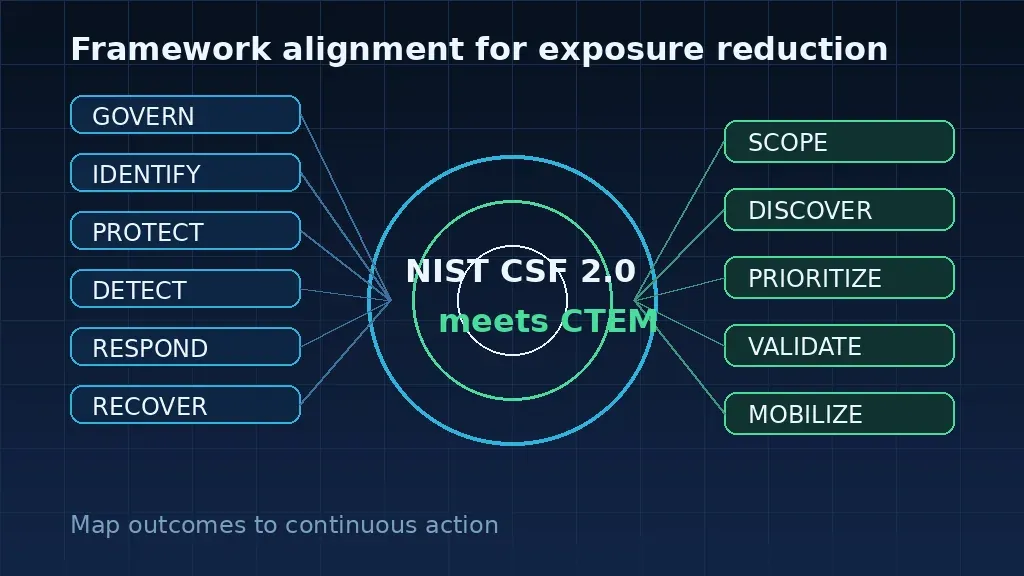
A ransomware incident response playbook is a set of clear steps that help security teams find, stop, and fix a file-encrypting attack before it spreads. This guide ensures every team member knows their exact role when speed is vital, which helps to lower the risk of damage to critical business data. According to the National Institute of Standards and Technology (NIST), a strong plan must cover the stages of detection, containment, eradication, and recovery from any threat. A good playbook also helps teams follow Continuous Threat Exposure Management (CTEM) by testing for gaps in security before a real attack starts to hurt operations. Having these steps ready allows your team to stay calm and work fast to protect the reputation and financial health of the company during a crisis.
Preparation: Building the Foundation of a Ransomware Response Plan
A strong ransomware incident response playbook starts long before an attack occurs. Preparation is the most vital phase of any security strategy. Organizations must build a solid base to reduce the chance of a successful breach. This phase involves setting up clear rules, tools, and plans to handle a crisis. By focusing on readiness now, you can keep your business running when a threat hits.
Asset Visibility and Data Integrity
You cannot protect what you do not see. A full asset inventory is needed to find the scope and impact of an attack. This list should include every server, laptop, and cloud app in your network. Knowing where your data lives helps you prioritize what to save first. It also helps teams spot where ransomware operator tactics might target your most critical files.
Data integrity is also key for a fast response. You must have a way to verify that your files have not been changed by an attacker. Modern data integrity checks help you find and react to destructive events early. This level of visibility ensures that your team is not working with blind spots during a live incident.
Offline Backups and Proactive Testing
Robust backup plans are your last line of defense. You should keep copies of your data in a way that attackers cannot reach. Offline backups prevent ransomware from locking your safety nets. But having a backup is not enough. You must also test your recovery steps often to ensure they work. Testing helps find gaps in your plan before you are forced to use it under pressure.
Regular drills ensure that every team member knows their role. These exercises and simulations test how well your plan works in the real world. They show if your team can meet recovery time goals. When you test often, you turn a complex plan into a set of smooth, fast actions that save time and money.
Mapping Attack Paths with BAS
Proactive security means finding how an attacker gets in. Breach and Attack Simulation (BAS) tools map out every path a threat might take. These tools show how small gaps can be linked to reach your best data. This is a core part of Continuous Threat Exposure Management (CTEM). It moves your team from guessing to knowing exactly how to stop risks.
BAS helps you see the network through the eyes of a hacker. By running these tests, you can fix weak spots before a real attack starts. This method is much faster than old ways of checking for bugs. It gives you a clear, threat-led view of your security state. This way, your simulation data directly informs your response playbook.
Detection and Analysis: Spotting the Warning Signs of a Ransomware Attack
A good ransomware incident response playbook depends on fast detection. Finding a threat early can mean the difference between a small fix and a total shutdown. Security teams must look for small clues that show an attacker is in the network. Catching these signs before they lock any files is key to a strong defense.
Common signs of a breach
One of the first signs of trouble is strange system behavior. This might include new user accounts or tools like PowerShell running in odd ways. Many attackers also try to turn off security software or delete system logs to hide. Seeing these changes often means a ransomware operator is now moving through your systems.
Another big warning sign is a spike in network traffic. Attackers often move large amounts of data out of the network before they start to encrypt it. NIST notes that actors now use double extortion by combining encryption with theft for more leverage. Watching these outbound flows is a key part of continuous monitoring for early detection.
The power of threat intelligence
To stay ahead, teams must know what to look for based on real trends. Security experts can use threat intelligence from HiveForce Labs to see which actors are most active. This team tracks over 250 threat actors and how they work. This data helps teams find active exploit activity and guess what a group might do next.
Knowing the tradecraft of specific groups makes detection much easier. For example, recent threat alerts cover groups like Gentlemen, BlackNevas, Nightspire, and LeakNet. By using these alerts, security teams can set up their tools to flag the exact steps these actors take. This proactive approach is a core part of Continuous Threat Exposure Management (CTEM).
Using automated alerts
Manual checks are not enough to catch fast-moving threats. Automated alerting tools can find odd behavior as soon as it starts. These systems can flag when a user logs in from a new place or when too many files change at once. According to NIST, identifying indicators early helps teams stop an attack before it spreads.
A good playbook links these alerts to clear next steps. When a tool flags a high-risk event, the team must know how to verify the threat fast. This speed helps reduce the impact of an attack and keeps the business running. High-quality data and fast alerts turn reactive security into a proactive defense.
Containment Strategies: Stopping Ransomware in Its Tracks
Containment is a vital part of any ransomware incident response playbook. This phase aims to stop the spread of malicious code and limit the impact on your business. Once your team finds a threat, they must act fast to keep the infection from reaching other parts of the network.
Isolate the threat
The first goal is to cut off the path for the ransomware. This often involves isolating affected systems or network zones from the rest of the environment. Fast action here keeps the threat from moving to other servers or data stores. Teams should also find and block any paths to command and control servers.
You can use network tools to set up walls between zones. This prevents lateral movement, which is how attackers move through your network to find more data. By limiting where the malware can go, you protect your most vital assets. Organizations should also check ransomware operator tactics to see how these threats spread.
Lock down accounts
Attackers use stolen accounts to move through your network. Your team should disable any compromised accounts as soon as they are found. This stops the attacker from using those rights to reach more data or tools. Use the principle of least privilege to limit what each user can do in the first place.
Changing keys and passwords for service accounts is also a smart move. These accounts often have high rights and can be hard to track. By locking down these entry points, you make it much harder for the ransomware to keep working. This part of the ransomware incident response playbook is key to stopping a breach from growing.
- Isolate infected devices. Pull the network cable or shut down the Wi-Fi on any laptop or server showing signs of ransomware. This stops the spread of the code to other machines.
- Disable user accounts. Freeze any accounts that show odd activity. This blocks the attacker from using valid logins to move within your network.
- Segment network zones. Close off network paths between different parts of the company. This keeps the ransomware trapped in one area and protects your main data.
- Block malicious IPs. Use your firewall to block any web addresses linked to the attack. This cuts the link between the malware and the person who sent it.
- Audit service accounts. Check the logs for any high-level accounts used by apps. If you see bad activity, reset the passwords to stop the attacker.
- Preserve evidence. Do not wipe the infected machines right away. Keep them in a safe state so you can study the RaaS operations analysis later.
Prepare for next steps
Once you contain the threat, you can start to plan for recovery. This involves a risk-based approach to decide which systems to fix first. Understanding the full impact on your data helps you focus your work where it is needed most. Keep clear lines of talk open with all people in the loop.
Regular testing of your response steps is also vital. By running drills, your team can learn how to react fast when a real attack happens. Using a platform that simulates attacks can help you find gaps in your plan. This helps you build a better plan for Continuous Threat Exposure Management (CTEM).
Eradication and Recovery: Restoring Operations Safely
After you stop the spread of a threat, you must clear the system of all malware. This step in a ransomware defense guide is known as eradication. It starts by finding the root cause. You must find how the actors got in and what they left behind. If you skip this, the threat can come back soon after you restart your tools.
Removing the threat
You must wipe all infected files and fix the flaws that led to the breach. This often means you need to rebuild systems from scratch. Using clean images is the best way to be sure no hidden files remain. You must also check that your backups are safe and free of any bad code. NIST notes that data integrity is key to a good response.
Prioritized remediation
Teams cannot fix every flaw at once during a recovery. You must focus on the most vital paths. Tools like Hive Pro's Unictor engine help by using vulnerability and threat prioritization. Instead of just looking at raw scores, it looks at how actors use flaws in the real world. This helps you patch the right holes first so you can get back to work safely.
Safe recovery steps
Getting back to normal must be a slow and steady process. You should bring one service back at a time to watch for any new signs of the threat. This is a core part of a ransomware incident response playbook used by top teams. It helps ensure that your network is stable before all users log back in. Testing and watching for any odd traffic is vital during this time.
Post-Incident Lessons Learned: Refining Your Ransomware Incident Response Playbook
The final stage of a ransomware event is not the recovery of data but the review of the event itself. A post-incident review helps your team find and fix gaps in your security. It ensures your ransomware incident response playbook stays current and useful. This phase allows you to look at the attack path and see how the threat moved through your network.
Analyze defensive gaps
Reviewing a ransomware event shows where your tools failed. You must look at how the threat actor gained access and how they moved. Many teams find that poor asset visibility or weak links allowed the spread. Using breach and attack simulation helps you test these paths before a real crisis hits. It lets you see if your changes actually stop similar threats.
You should also check how long it took to find and stop the threat. Use data to see if your team followed the steps in your plan. If there were delays, find out if they were due to bad data or lack of tools. A clear post-incident review leads to better response in the future. It turns a bad event into a lesson for the whole company.
Update your living document
Your ransomware incident response playbook must change as new threats appear. Do not let it sit on a shelf and collect dust. You should update it after every test or real event to keep it fresh. This process is a key part of Continuous Threat Exposure Management (CTEM). It helps you stay ahead of ransomware operator tactics that change often.
Make sure every team member knows their new roles after an update. Document every attack path you find and share those details with your SOC. When you find new ways an actor might chain vulnerabilities, add them to your playbook. Keeping your plan as a living document ensures your team is ready for the next threat. This constant work makes your security stronger over time.
How Traditional Vulnerability Scanners Fall Short in Ransomware Defense
Old tools often fail to stop modern threats. Most teams use tools that only look for known bugs. These tools give each bug a score. This score helps teams decide what to fix first. But these scores do not show the real risk. A low score bug can still let a hacker in. This is why ransomware operator tactics focus on more than just bugs.
The flaws of CVSS scores
Common scores do not look at how your business works. They treat every system the same way. A bug on a test server gets the same score as one on a main data store. This makes it hard to see which gaps are most risky. Hackers often use small flaws to move through a network. They do not just look for big bugs. They look for the easiest path to your data. Relying on old scores leaves your most vital files at risk.
Most scanners only run once a month or once a week. This creates a big gap in your sight. New threats appear every day. A scan from last week will not see a threat that started today. The NIST IR 8374r1 rules say you must find and contain risks fast. Old tools are too slow for this goal. They tell you what was wrong in the past. They do not tell you what is wrong right now.
Comparison of Tools for Ransomware Defense
| Feature. | Old Scanners. | CTEM Platforms. |
|---|---|---|
| Asset View. | Known items only. | Full cloud and local view. |
| Test Method. | Check for bugs. | Run real attack tests. |
| Context. | Static scores. | Live threat data. |
| Path Analysis. | None. | Finds full attack routes. |
| Update Speed. | Weekly or monthly. | Constant and real-time. |
Missing the full attack path
Attackers do not just hit one bug and stop. They chain many small issues together. They use weak passwords and wrong settings to gain power. Old scanners do not see these links. They only see one bug at a time. This is why you need a better ransomware defense guide to stay safe. A unified tool like Uni5 Xposure finds every step a hacker might take. It shows you the whole path before the attack happens.
Modern defense must be active. You should not wait for a scan to tell you that you are at risk. CTEM platforms test your network all the time. They use breach and attack tests to find weak spots. This helps you fix the most vital gaps first. By closing these paths, you stop ransomware before it can start. This keeps your business safe and your data secure.
Frequently Asked Questions
What are the steps of a ransomware incident response plan?
A ransomware incident response plan follows four main stages. These are detection, containment, eradication, and recovery. According to the NIST, teams must first find the threat and stop it from spreading to other systems. After they remove the malware, the team works to restore data from safe backups. This path helps firms lower the impact and cost of an attack while keeping the business running. This plan makes the team fast and ready for any threat.
How do you mitigate a ransomware attack during an incident?
To stop a ransomware attack, you must quickly isolate the infected systems. This prevents the malware from moving across your network and locking more files. NIST guidelines suggest that teams should also turn off network segments and change access keys. Once the threat is contained, the security team can find the root cause and clean the environment. This fast action is vital to protect your most critical business data and keep your customers safe.
Why is a ransomware response playbook important for security teams?
A playbook gives security teams a clear set of rules to follow during a crisis. Without it, teams may make slow choices that lead to more data loss. Research from NIST shows that a living playbook helps firms keep up with new threats like double extortion. It also defines who is in charge so that work is fast and smooth. This plan ensures that the firm stays safe and follows all laws and rules.
What framework should be used for ransomware incident response?
Most firms use the NIST framework to guide their response to ransomware. This model helps teams organize their work into clear phases like preparation and detection. According to NIST, linking this plan to the main risk framework helps a firm stay ready. It also makes it easier to track progress and share facts with the board. Using a standard framework ensures that no vital steps are missed during a high-stress event.
What is an example of a ransomware incident response playbook?
A common example of a playbook is the ransomware guide from NIST. It shows exactly what to do when an attack happens. For instance, it lists who to call and how to stop the spread of the virus. According to NIST, a good playbook should cover both tech tasks and business rules. This helps the whole team work together to fix the problem fast. It also keeps the firm in line with rules and laws.
Ready to build a better ransomware response plan?
Every minute you wait to fix your gaps gives bad actors a chance to find a way into your site and steal your data. A slow response to a ransomware attack often leads to high costs, lost files, and a long time to get your work back to normal. Starting your plan today means you can find and close weak spots before a real event hits and gives your team the path they need. Waiting until after a threat starts to test your plan will only make the harm much worse and the fix for your business much harder. Taking action now allows you to build a strong defense and ensure that your critical assets stay safe even when a new attack occurs.
Ready to stop threats? Schedule a personalized demo of Uni5 Xposure to see how you can keep your data safe and secure today.